Skip to content

Automate · Lead-to-cash CRM

Custom CRM Development: Lead to Cash

We build custom CRMs that run your whole sales flow, from the first enquiry to the paid invoice. Leads from your forms, ads and inbox land in one pipeline, the AI drafts the follow-up and the quote, you approve them, and invoices and payment reminders go out on their own. You get a system shaped around your process, not a generic CRM you have to bend.

Who it's for

Is this the right service for you?

A good fit if you are

  • Service businesses where leads arrive from several places (web forms, Meta lead ads, email) and some go cold before anyone replies.
  • Owners who type quotes and invoices by hand and chase payments from memory.
  • Teams that tried an off-the-shelf CRM and ended up working around it in spreadsheets.
  • Businesses that want AI to draft emails and quotes but insist on approving anything a customer sees.

Not the right fit if you are

  • Companies happy with HubSpot, Pipedrive or GoHighLevel as they are: you need configuration, not a custom build. Our GoHighLevel setup or email and CRM service is the better fit.
  • Large companies that need a vendor with a big support desk and a formal procurement process.
  • Anyone looking for a fully autonomous AI that sends without a human check. We do not build that.

Problems we solve

What this fixes

  • Leads go cold between the form and the first reply

    An enquiry that waits a day for an answer is often lost. The CRM captures every lead the moment it arrives, assigns it, and prepares a personalised first reply for you to approve or send automatically.

  • Quotes and invoices are typed by hand

    Copying details from an email into a quote, then into an invoice, wastes hours and creates mistakes. The system builds the quote from the lead record and turns the accepted quote into an invoice in your accounting tool.

  • Nobody knows what is paid

    Payments arrive by card, bank transfer and subscription. Payment webhooks update each deal automatically, and overdue invoices trigger polite, scheduled reminders.

  • Follow-ups depend on someone remembering

    Scheduled jobs check every open deal, draft the next follow-up and flag the deals that need you. Replies are detected and linked back to the right lead, so a conversation never splits across inboxes.

  • AI tools you cannot see or control

    Every AI draft goes through an approval dashboard first. You see what will be sent, edit it if needed, and approve. Nothing customer-facing leaves without a rule you agreed.

Deliverables

What you get

A working CRM in production, documented and handed over. Typical scope:

  • Lead capture from web forms, Wix or WordPress forms, Meta lead ads, email and webhooks into one pipeline
  • Pipeline stages, tags and custom fields modelled on how you sell
  • AI-drafted follow-up emails and quotes with an approval dashboard (you approve, then it sends)
  • Reply detection that links incoming email to the right lead
  • Quote to invoice in your accounting tool, for example QuickBooks, with payment status synced back
  • Online payments and subscriptions through Stripe, with dunning for failed payments
  • SMS and email sending through Twilio and Brevo, from your own domain
  • Error alerts and a system log, so a broken integration is noticed the same day
  • A QA report and a recorded demo at handover, plus admin documentation
  • Hosting set up in your own accounts, with backups

Process and timeline

How the work runs

  1. Free scoping call

    We map your current flow from enquiry to payment, the tools you keep, and what the AI may and may not do. You get a written scope and a fixed quote split into milestones.

  2. Data model and pipeline

    We design the stages, fields and permissions with you first, because a CRM is only as good as its data model. You approve it before any screens are built.

  3. Build in milestones

    Capture and pipeline first, then follow-ups and approvals, then quotes, invoices and payments. You test each milestone on real examples before the next one starts.

  4. Launch and handover

    We import your existing contacts, switch the forms over and watch the first live leads together. You receive the QA report, a recorded walkthrough and admin docs.

  5. Support and care

    Thirty days of post-launch support are included. After that, a support retainer keeps the integrations, AI prompts and API keys current.

Timeline

Typical MVP delivery in 14 days (scope-dependent).

Pricing

What it costs

How we price

Fixed quote after a free scoping call

We agree the scope on a short call, then send you a written fixed quote split into milestones.

  • You pay in milestones, each one only after you approve it.
  • 100% of the IP and source code transfers to you on completion.
  • 30 days of post-launch support included.

Why no price list?

Every build here is shaped by your tools, data and process, so a price list would either overcharge simple projects or hide costs in complex ones. A fixed quote after a short call is fairer to both sides.

Small fixed-scope tasks: see our Fiverr Pro gigs (opens Fiverr in a new tab)

Three ways to work with us

  • Fixed quote, paid in milestones. For project builds: a fixed quote after a free scoping call, paid milestone by milestone.
  • Hourly. For smaller changes and work that is hard to scope up front.
  • Monthly retainer. For ongoing maintenance, updates and support, used when you need it. About retainers

Proof

Work we can show you

Real builds, described plainly. We publish no results figures we cannot evidence.

FORTE Athletics: lead-to-cash CRM for a US sports coaching business

Leads from web forms, Wix and Meta lead ads flow into a custom CRM. The AI drafts follow-up emails and quotes on Gemini, and the owner approves them in a dashboard. Replies are detected and linked to the lead, accepted quotes become QuickBooks invoices with payment webhooks, and Stripe handles subscriptions with dunning. Twilio sends SMS and Brevo sends email. Hourly follow-up jobs, error alerts and webhook logs keep it honest. An earlier version ran as an n8n sales pipeline.

  • React
  • TypeScript
  • Supabase
  • Edge functions
  • pg_cron
  • Gemini
  • QuickBooks API
  • Stripe
  • Twilio
  • Brevo
  • n8n

Invollo, our own invoicing and billing product

We run Invollo ourselves: invoicing, recurring billing, reminders and dunning, a client portal, Stripe and PayPal payments, monitoring, nightly backups and written runbooks for deploys and incidents. It is why our CRMs treat invoices, payments and backups as first-class parts of the build.

  • React
  • Supabase
  • Stripe
  • PayPal
  • Brevo

What Fiverr buyers wrote

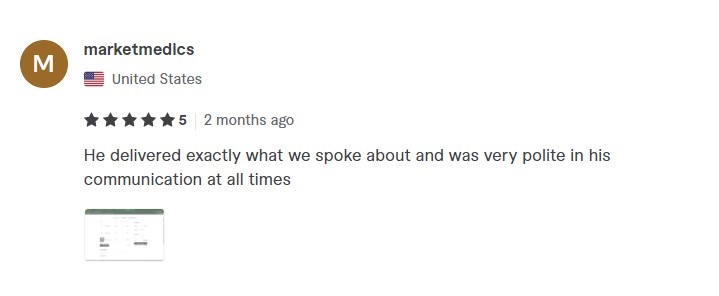
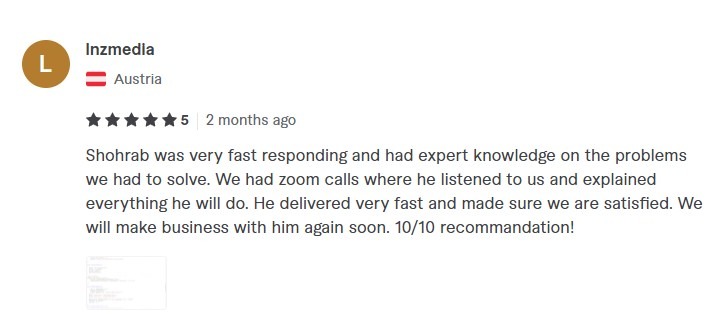
Screenshots of reviews on our public profile, uncut. They come from a range of projects, not only this service. Read every review on Fiverr (opens in a new tab).

Fiverr review screenshot, buyer in United States: "He delivered exactly what we spoke about and was very polite in his communication at all times"
Verbatim Fiverr review, buyer in United States
Fiverr review screenshot, buyer in Austria: "Shohrab was very fast responding and had expert knowledge on the problems we had to solve. We had zoom calls where he listened to us and explained everything he will do. He delivered very fast and made sure we are satisfied. We will make business with him again soon. 10/10 recommandation!"
Verbatim Fiverr review, buyer in Austria

Founder-led by Shohrab H. Abhi. Tecnomaxx Digital Ltd, company no. 15398595 (Companies House). Delivery is from Bangladesh.

Tools and integrations

What we build with

Core
  • Supabase (Postgres, edge functions, cron)
  • React
  • TypeScript
  • n8n for integrations you want to edit yourself
Money
  • QuickBooks
  • Stripe
  • PayPal
  • MobilePay
  • Revolut
Messaging
  • Brevo
  • Twilio SMS
  • Gmail and Microsoft 365 mailboxes
Lead sources
  • Website forms
  • Wix and WordPress forms
  • Meta lead ads
  • Webhooks from any tool
AI
  • Gemini
  • Claude
  • OpenAI
  • always behind an approval step

FAQ

Questions buyers ask

Taken from what people actually search for about this service.

How much does a custom CRM cost?

It depends on how many lead sources, integrations and approval steps you need, so we give a fixed quote after a free scoping call rather than a range that means nothing. You pay in milestones, each one only after you approve it, and you can start with the core pipeline and add quoting or payments later.

Is a custom CRM better than HubSpot or Pipedrive for a small business?

Not always. If an off-the-shelf CRM fits your process with light configuration, use it. A custom CRM pays off when you keep working around the tool, pay for seats nobody uses, or need quoting, invoicing and local payment methods in one place.

Can the CRM use AI without sending things I have not checked?

Yes. That is the default in everything we build: the AI drafts follow-ups and quotes, and they wait in an approval dashboard until you or your team approve them. You decide which messages, if any, may go out automatically.

Will it work with QuickBooks, Stripe and my existing email?

Yes. We have built QuickBooks invoicing with payment webhooks, Stripe subscriptions with dunning, and sending through Brevo and Twilio. Your existing mailbox stays; replies are detected and linked to the right lead.

What is the difference between CRM automation and a custom CRM?

CRM automation connects and automates the CRM you already have, usually with n8n, Make or the CRM’s own workflows. A custom CRM replaces it with a system built around your process. Many clients start with automation and move to a custom build when they outgrow it.

Who owns the CRM and the data?

You do. 100% of the IP and source code transfers to you on completion, and the system runs in accounts you own, so you are never locked in to us.

How long does it take to build?

Typical MVP delivery in 14 days (scope-dependent). That first release covers capture, the pipeline and follow-ups; quoting, invoicing and payments follow in later milestones.